<?xml version="1.0" encoding="utf-8"?><feed xmlns="http://www.w3.org/2005/Atom" ><generator uri="https://jekyllrb.com/" version="3.9.5">Jekyll</generator><link href="/feed.xml" rel="self" type="application/atom+xml" /><link href="/" rel="alternate" type="text/html" /><updated>2024-05-08T07:39:41+00:00</updated><id>/feed.xml</id><title type="html">David Day</title><subtitle>David Day. </subtitle><entry><title type="html">What is UART?</title><link href="/blog/what-is-uart" rel="alternate" type="text/html" title="What is UART?" /><published>2024-05-08T00:00:00+00:00</published><updated>2024-05-08T00:00:00+00:00</updated><id>/blog/what-is-uart</id><content type="html" xml:base="/blog/what-is-uart"><![CDATA[<p>A better question is, “How is UART?” Or better yet, “What is a UART?” 50 years ago the answer would have been unambiguous. 
But today it seems the meaning has been all but obscured. Many will tell you UART is a protocol. WRONG! Stop the misinformation! 
The answer is in the name itself: Universal Asynchronous Receiver Transmitter. Admittedly, that doesn’t help much.
To understand the true meaning we must look back to prehistoric times, when cave dwellers applied voltages to wires
and wiggled them high and low to send signals.</p>

<p>During this early period, a.k.a 1960, RS-232 was created as a standard for serial communication
transmission. RS-232 defines the electrical characteristics and timing of signals, the pinout of connectors between devices, 
and pretty much all the other basic properties one needs to specify to enable semi-reliable electrical communication between two systems.
RS-232 is also not a protocol, but rather an interface. And RS-232 was not the only serial interface back then. 
RS-422 was issued in 1975 and RS-485 in 1983. Each specify their own voltage levels and wiring arrangements.</p>

<p>Originally, the UART was a discrete integrated circuit, part of the serial port hardware on a computer or terminal. 
The UART would read incoming bits on its RX line and wiggle out bits on its TX line, while a separate IC, or sometimes internal circuits in the UART, 
would convert the signals to RS-232 voltage levels, or whatever interface the serial port supported.</p>

<p>Now that we’ve established what the UART was originally, its full name should make more sense.
The receiver/transmitter part are pretty self-explanatory. It received and transmitted serial data–in full duplex.
It was asynchronous: the systems on either side of the RX/TX lines had to agree on a baud, the speed at which to shift out bits.
And it was universal in that you could configure the baud and character format, among other things, and use it
to communicate over virtually any of the standard serial interfaces. A UART!</p>

<p>Fast-forward to today, and the old interfaces like RS-232 have been replaced by high speed standards
like USB and Ethernet. But UARTs live on, mostly in the form of modules on your typical system-on-chips.
Even a simple SoC will often have four or more UARTs. The biggest difference between modern UARTs and those of old
is that they’re no longer discrete chips; I think this is where a lot of the confusion stems. 
Other than that, their behavior is largely the same. And although the serial interfaces that UARTs once implemented
are no longer widely used, UARTs are still useful for their simplicity and ubiquity, 
especially in applications involving short-range, low-speed serial communication.</p>]]></content><author><name></name></author><summary type="html"><![CDATA[A better question is, “How is UART?” Or better yet, “What is a UART?” 50 years ago the answer would have been unambiguous. But today it seems the meaning has been all but obscured. Many will tell you UART is a protocol. WRONG! Stop the misinformation! The answer is in the name itself: Universal Asynchronous Receiver Transmitter. Admittedly, that doesn’t help much. To understand the true meaning we must look back to prehistoric times, when cave dwellers applied voltages to wires and wiggled them high and low to send signals.]]></summary></entry><entry><title type="html">A Case Against IDEs</title><link href="/blog/a-case-against-ides" rel="alternate" type="text/html" title="A Case Against IDEs" /><published>2023-09-22T00:00:00+00:00</published><updated>2023-09-22T00:00:00+00:00</updated><id>/blog/a-case-against-ides</id><content type="html" xml:base="/blog/a-case-against-ides"><![CDATA[<p>I’ve used PyCharm and Vim, and occasionally VSCode. I’ve enjoyed different features from each.
But I think in the long run Vim wins out.</p>

<p>PyCharm really does have some handy tools. There’s a feature to display all occurrences of a string 
to replace and individually confirm each replacement. I find it useful whenever I have 
to port certain projects to new platforms. 90% of the work involves copying files and replacing all the instances of a 
particular string with the new platform name. Sometimes there are instances where you don’t want to replace a particular occurrence.</p>

<p>To do something like that while using Vim, you could do it a few ways.</p>

<p>The first thing you could do is run <code class="language-plaintext highlighter-rouge">:vimgrep [pattern][file(s)]</code> manually go through the
matches with <code class="language-plaintext highlighter-rouge">:cnext</code> and <code class="language-plaintext highlighter-rouge">:cprev</code> and change each occurrence. Another option is to use <code class="language-plaintext highlighter-rouge">grep</code> 
to display all of the occurrences and again manually address each one. 
Or instead of manually modifying each occurrence, after you determine from the 
grep output that you want to modify all of the occurrences, you could run 
<code class="language-plaintext highlighter-rouge">find . -type f -exec sed -i 's/[search]/[replace] /g' {}\;</code> to do that.</p>

<p>Or you could take a different approach and scour the internet for a plugin that does it. 
I haven’t used it, but <a href="https://github.com/neoclide/coc.nvim">coc.nvim</a> 
(teehee) seems like a powerful plugin. It is compatible with both Vim and Neovim, 
although I’m not sure if the same capabilities are supported for both.</p>

<p>Sure, you could do any of those things, but they feel clunky. The CLI commands don’t offer the
same granularity with the same ease. And you may not even have access to the internet in the 
moment to download the plugin. PyCharm has this functionality built in.</p>

<p>But PyCharm is <em>so</em> heavy. I’ve seen it take up 4GB of memory. It often freezes up 
and throttles the computer. For large projects, its code completion engine
can stall for hours as the program indexes your project and generates the insights.</p>

<p>VSCode is a lighter alternative that also has powerful code completion features. 
It’s easy to download plugins and navigate project files. 
But code completion will struggle for larger projects, so it diminishes VSCode’s usefulness overall.</p>

<p>Large projects are really the main reason to get familiar with Vim, and that means also getting
familiar with CLI tools like <code class="language-plaintext highlighter-rouge">grep</code>, <code class="language-plaintext highlighter-rouge">less</code>, and <code class="language-plaintext highlighter-rouge">find</code>. In projects with deeply nested structures 
and lots of files strewn about, code completion is bad with most IDEs I’ve used. Especially in C projects. 
<code class="language-plaintext highlighter-rouge">ctags</code> is a great CLI tool for getting similar <code class="language-plaintext highlighter-rouge">goto</code> functionality in Vim, and it has the 
added benefit that you can seamlessly hop between definitions of symbols across languages. 
This is really helpful in projects that contain mixed code. And my Vim process instance is 
currently using a third of a gigabyte of memory and practically zero CPU time.</p>

<p>Another benefit of Vim is its level of configurability. 
If you use an IDE with features like code completion baked in, 
you get the convenience of not having to do any manual configuration.
Those features <em>just work</em> and everything is fun and rainbows.</p>

<p>Honestly, the find and replace feature in IDEs is great, and there aren’t many alternatives
that can stand up to it. But that’s really the extent of their usefulness. After that they
just become big, slow memory chomping behemoths, or they can’t handle the codebase and their code
completion becomes useless, or both.</p>

<p>You’re better off switching to Vim and accepting the pain you have to endure when you 
occasionally have to do extensive renaming. If you really care that much, you could always
download PyCharm to use solely as a find and replace tool.</p>]]></content><author><name></name></author><summary type="html"><![CDATA[I’ve used PyCharm and Vim, and occasionally VSCode. I’ve enjoyed different features from each. But I think in the long run Vim wins out.]]></summary></entry><entry><title type="html">OpenEEPROM, the Universal Programmer</title><link href="/blog/open-eeprom" rel="alternate" type="text/html" title="OpenEEPROM, the Universal Programmer" /><published>2023-08-13T00:00:00+00:00</published><updated>2023-08-13T00:00:00+00:00</updated><id>/blog/open-eeprom</id><content type="html" xml:base="/blog/open-eeprom"><![CDATA[<p>Earlier this year I started building a 6502-based computer on breadboards.
My goal was ultimately to map the system onto a PCB and create a single-board
computer. But it’s August now and I’ve made very little progress on the project. 
The main reason boils down to one thing: I’m cheap.</p>

<p>You see, I’d gotten to the point where the CPU was wired up to a ROM chip.
At this point, I needed to start programming the ROM so that I could experiment
with the CPU, connect and test out RAM, etc. But I didn’t have a programmer. 
The obvious choice was a 
<a href="https://www.amazon.com/Universal-Programmer-TL866II-MiniPro-Adapter/dp/B091TPHW1M">MiniPRO T86xx</a> 
programmer like Ben Eater uses in his videos for the same purpose. But that thing costs $80…
Frankly, I’m sure I’d get my money’s worth, but I just couldn’t bring myself to spend that much on it.
To be fair, I could probably find a cheaper one that works well enough for as low as $30. 
But even that was more than I felt like spending, plus I’d have to wait a few days for shipping. Why do that when 
instead I could spend the next few months building my own? Enter ~OpenEEPROM~ <em>gasps</em>.</p>

<h2 id="openeeprom">OpenEEPROM</h2>

<p>OpenEEPROM is the many-months-long culmination of multiple attempts at creating a universal programmer. It’s free and
open source. The term OpenEEPROM is overloaded. Not only is it the name of the project, but it’s also the name 
of the protocol around which the project is built. The OpenEEPROM protocol is a set of commands for 
programming parallel and SPI chips (and I2C eventually). To be used, the protocol requires two components:</p>

<ol>
  <li>A programmer running firmware that implements all of the commands.</li>
  <li>A host that sends and receives commands to and from the programmer.</li>
</ol>

<p>The programmer is responsible for handling the digital signals to and from a memory chip,
while the host serves as the user interface running on PC. A common transport layer must be implemented by
both the host and the programmer to  enable communication between them, but there’s no restriction on what 
kind of transport layer is used except for which peripherals are available on the programmer. 
For example, if the programmer has a USB peripheral, the host can send commands over USB. 
If the programmer has a UART, the host can send commands over a serial port. 
If the programmer has a protocol stack, the host can send commands over TCP.</p>

<h2 id="the-protocol">The Protocol</h2>

<p>The <a href="https://github.com/davidday99/open-eeprom/blob/main/open-eeprom-protocol.txt">protocol</a>
 is little-endian byte-stream-oriented and lays out the exact format of every command, its
parameters, and its return value(s). Every command will return at least a response status byte:</p>

<ul>
  <li>ACK: 0x05, indicating the command was run successfully</li>
  <li>NAK: 0x06, indicating the command failed</li>
</ul>

<p>The command set includes commands such as <code class="language-plaintext highlighter-rouge">set_address_hold_time</code>, <code class="language-plaintext highlighter-rouge">parallel_read</code>, <code class="language-plaintext highlighter-rouge">set_spi_clock_freq</code>, 
and <code class="language-plaintext highlighter-rouge">spi_transmit</code>. The set is designed to be as small as possible while enabling enough control for 
any kind of EEPROM or flash chip to to be programmed using drivers written on the host side.</p>

<h2 id="the-programmer-firmware">The Programmer (Firmware)</h2>

<p>The OpenEEPROM project contains a <a href="https://github.com/davidday99/open-eeprom-fw">firmware implementation</a>. 
To maximize its usefulness, I’ve tried to make it simple to port the firmware to new MCUs. 
Porting to a new MCU requires that you implement a <code class="language-plaintext highlighter-rouge">programmer</code> interface and a <code class="language-plaintext highlighter-rouge">transport</code> interface. 
The <code class="language-plaintext highlighter-rouge">programmer</code> interface covers all of the digital IO functionality like setting
the value on a parallel address bus or transmitting bytes over SPI. The <code class="language-plaintext highlighter-rouge">transport</code> interface covers the communication
functionality needed to send and receive data to and from the host. These interfaces are best implemented using
a BSP for the MCU.</p>

<h2 id="the-host">The Host</h2>

<p>The OpenEEPROM project also contains a 
<a href="https://github.com/davidday99/open-eeprom/tree/main/openeeprom">Python host implementation</a>. 
At the lowest level is the <code class="language-plaintext highlighter-rouge">BaseTransport</code> interface.
<code class="language-plaintext highlighter-rouge">BaseTransport</code> hides the details of a transport layer behind two methods, <code class="language-plaintext highlighter-rouge">send</code> and <code class="language-plaintext highlighter-rouge">receive</code>. They work by sending
or receiving <em>n</em> bytes, an abstraction that plays well with the stream-oriented nature of the OpenEEPROM protocol.
Currently there are two classes that implement the interface: <code class="language-plaintext highlighter-rouge">SerialTransport</code> and <code class="language-plaintext highlighter-rouge">TcpTransport</code>.</p>

<p>Above the transport layer is the <code class="language-plaintext highlighter-rouge">OpenEEPROMClient</code> class. <code class="language-plaintext highlighter-rouge">OpenEEPROMClient</code> is initialized with a <code class="language-plaintext highlighter-rouge">BaseTransport</code> 
object and uses it to implement all of the OpenEEPROM protocol commands. This allows you to make calls like 
<code class="language-plaintext highlighter-rouge">OpenEEPROMClient.parallel_read</code> to the programmer without worrying about which actual transport
medium is used.</p>

<p>Chip drivers implement the <code class="language-plaintext highlighter-rouge">BaseChip</code> interface, which includes <code class="language-plaintext highlighter-rouge">read</code>, <code class="language-plaintext highlighter-rouge">write</code>, and <code class="language-plaintext highlighter-rouge">erase</code> methods and a 
<code class="language-plaintext highlighter-rouge">client: OpenEEPROMClient</code> attribute. <code class="language-plaintext highlighter-rouge">client</code> is used to implement the RWE methods. 
Additional chip-specific methods can be adde to the class.
For example, some chips support software-enabled protection or have status registers that can be queried.</p>

<h2 id="a-robust-command-set">A Robust Command Set</h2>

<p>When it came to the protocol command set, I racked my brain for quite a while trying to 
decide on the minimum functionality necessary to enable programming any kind of parallel or SPI chip
from the host side. The commands would need to be able to account for any differences that could possibly exist
across chips.</p>

<p>For SPI, this is pretty straight forward. Every chip has essentially the same physical interface. It boils down to 
three main considerations:</p>

<ol>
  <li>SPI clock frequency.</li>
  <li>SPI mode.</li>
  <li>Chip-specific commands (e.g, the first byte you transmit is a command byte).</li>
</ol>

<p>Point 1 is straight forward. Have a command for setting the frequency. Done.</p>

<p>For Point 2, SPI devices may use one of four different modes:</p>

<ol>
  <li>Mode 0 - clock low in idle state, data sampled on rising edge and shifted out on falling edge.</li>
  <li>Mode 1 - clock low in idle state, data sampled on falling edge and shifted out on rising edge.</li>
  <li>Mode 2 - clock high in idle state, data sampled on rising edge and shifted out on falling edge.</li>
  <li>Mode 3 - clock high in idle state, data sampled on falling edge and shifted out on rising edge.</li>
</ol>

<p>And pratically all devices support Mode 0 anyway. Like Point 1, have a command to set the mode. Done.</p>

<p>And Point 3 really isn’t an issue because as long as there’s a command for transmitting data over SPI, 
the host side driver can handle any chip-specific commands.</p>

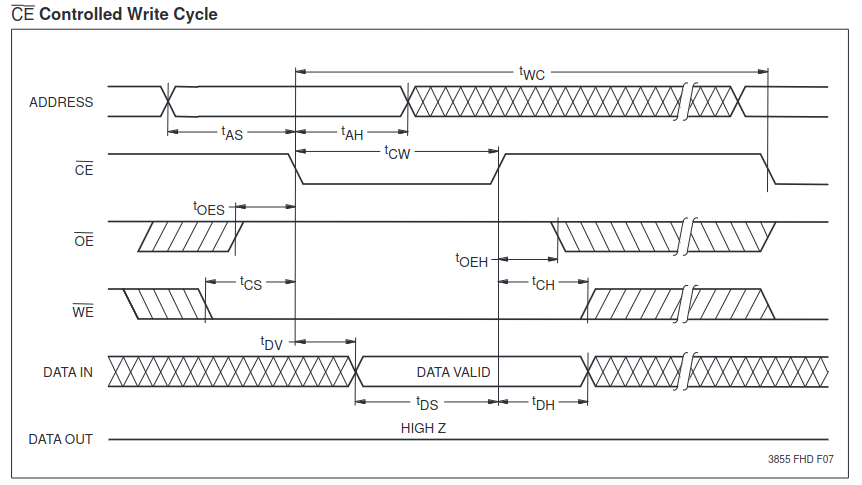
<p>Parallel chips are what I spent a long time trying to cover. The way I saw it, there are so many 
permutations of programming sequences for a parallel chip. So many pins, so many different timings.
I was staring at diagrams like this:</p>

<p><img src="/assets/img/parallel-eeprom-timing.png" alt="AT28C256 Write Timing" /></p>

<p>and I was terrified by them (this is for an AT28C256, btw).</p>

<p>But I finally came to the realization that was right in front of 
me the whole time.</p>

<p>Parallel chips all behave in essentially the same way. For a read:</p>

<ol>
  <li>Enable the chip and allow it to drive the data bus (pull down the CE line and the OE line).</li>
  <li>Set the address bus with the desired address.</li>
  <li>After a chip-specific duration (address hold time) read
 the data on the data bus.</li>
  <li>Disable the chip.</li>
</ol>

<p>This can be repeated however many times is desired.</p>

<p>A write is just slightly more involved:</p>

<ol>
  <li>Set the address bus(<strong>before enabling the chip, otherwise we risk corrupting the data at some other address</strong>).</li>
  <li>Set the data bus.</li>
  <li>Wait the address hold time.</li>
  <li>Enable the chip and and enable writing (pull down the CE line and the WE line).</li>
  <li>Wait a chip-specific duration (CE pulse-width time)</li>
  <li>Disable the chip.</li>
</ol>

<p>Depending on the chip, these steps may be repeated a certain number of times before a write cycle has to be performed,
which will require a wait on the order of milliseconds.</p>

<p>Aside from that, these two processes essentially characterize 
the read and write cycles for any parallel chip. So the only parameters that need to be controllable are 
the address hold time and CE pulse-width time.</p>

<p><strong>Note</strong>: I’m assuming that the control lines on a parallel chip (CE, OE, WE) are always active low. 
I’m not certain this is true 100% of time time, and if it’s not that’s one extra parameter to consider. However,
as far as I know, this does hold true, as the pinout that indicates these lines are active low
is a JEDEC standard for parallel chips.</p>

<h2 id="usage">Usage</h2>

<p>Assuming you have a programmer that speaks OpenEEPROM over a serial port, you can use the OpenEEPROM CLI tool built 
on top of the Python host. For example,</p>

<p>write the contents of <code class="language-plaintext highlighter-rouge">input.txt</code> to a 25LC320 SPI EEPROM:</p>

<div class="language-plaintext highlighter-rouge"><div class="highlight"><pre class="highlight"><code>$ python -m openeeprom write --file input.txt --chip 25LC320 --serial /dev/ttyACM0:115200
</code></pre></div></div>

<p>or to read the contents of an Atmel 28C256 parallel EEPROM into <code class="language-plaintext highlighter-rouge">output.bin</code>:</p>

<div class="language-plaintext highlighter-rouge"><div class="highlight"><pre class="highlight"><code>$ python -m openeeprom read --file output.bin --chip AT28C256 --serial /dev/ttyACM0:115200
</code></pre></div></div>

<p>You can also import OpenEEPROM directly:</p>

<div class="language-plaintext highlighter-rouge"><div class="highlight"><pre class="highlight"><code>from openeeprom.transport import SerialTransport
from openeeprom.client import OpenEEPROMClient
from openeeprom.chip import AT28C256

client = OpenEEPROMClient(SerialTransport(port='/dev/ttyACM0', baud_rate=115200))
chip = AT28C256()
chip.connect(client)

contents = chip.read(0, chip.size)
</code></pre></div></div>

<h2 id="future-additions">Future Additions</h2>

<p>There are lots of improvements/features to be made. The few that stick out to me the most are:</p>

<ol>
  <li>
    <p>Add I2C support to the OpenEEPROM command set.</p>
  </li>
  <li>
    <p>Add a GUI memory viewer to the Python host package. The GUI would allow you to
 view the contents of a chip, modify individual bytes, and select 
 a file from a file explorer to flash to the chip.</p>
  </li>
  <li>
    <p>Create an STM32 port for the OpenEEPROM firmware.</p>
  </li>
  <li>
    <p>Create a custom board with an attached MCU, 40-pin DIP socket,
 and USB-A header that I can use as a handy programmer.</p>
  </li>
</ol>

<p>There’s certainly enough here to keep me busy, but I think it’s about time I get back
to my 6502 SBC project.</p>

<p>View the OpenEEPROM source <a href="https://github.com/davidday99/open-eeprom">here</a>.</p>]]></content><author><name></name></author><summary type="html"><![CDATA[Earlier this year I started building a 6502-based computer on breadboards. My goal was ultimately to map the system onto a PCB and create a single-board computer. But it’s August now and I’ve made very little progress on the project. The main reason boils down to one thing: I’m cheap.]]></summary></entry><entry><title type="html">C Proficiency Test</title><link href="/blog/c-proficiency-test" rel="alternate" type="text/html" title="C Proficiency Test" /><published>2023-08-10T00:00:00+00:00</published><updated>2023-08-10T00:00:00+00:00</updated><id>/blog/c-proficiency-test</id><content type="html" xml:base="/blog/c-proficiency-test"><![CDATA[<p>If you can decipher this declaration</p>

<div class="language-plaintext highlighter-rouge"><div class="highlight"><pre class="highlight"><code>char (*(*x[3])())[5];
</code></pre></div></div>

<p>you are proficient in C and hereby earn a LinkedIn Skill Assessment badge.</p>]]></content><author><name></name></author><summary type="html"><![CDATA[If you can decipher this declaration]]></summary></entry><entry><title type="html">Vim is Just So Good</title><link href="/blog/vim-is-just-so-good" rel="alternate" type="text/html" title="Vim is Just So Good" /><published>2023-07-10T00:00:00+00:00</published><updated>2023-07-10T00:00:00+00:00</updated><id>/blog/vim-is-just-so-good</id><content type="html" xml:base="/blog/vim-is-just-so-good"><![CDATA[<p>Sometimes I question whether Vim is really as good as people make it out to be, 
or if its just some sense of nostalgia that makes it so endearing to them. 
Modern IDEs have so many bells and whistles. But then I remember how intuitive Vim key bindings tend to be.</p>

<p>For example: in Vim the append command <code class="language-plaintext highlighter-rouge">a</code>
puts the cursor after the current position and changes the editor
to insert mode. <code class="language-plaintext highlighter-rouge">shift + $</code> puts the cursor at the end of the line.
I wanted to put the cursor at the end of a line and begin typing from there,
and wouldn’t you know the command was <code class="language-plaintext highlighter-rouge">shift + a</code>. It was exactly what 
I expected it would be. Some people think you have to memorize a cheet sheet of all the commands.
Sure, there are a few commands that you do have to memorize, and the key-bindings take some getting used to. 
But learn those few commands and you’ll also gain many more simply because they’re intuitive and based on the handful you memorized.
It’s also just a satisfying feeling when you do learn a new command that was what you assumed it would be.</p>

<p>And then I realize that my favorite feature in all the IDEs I use is the code completion, 
and there are alternatives for Vim that work just as well, albeit after some tinkering with configurations, 
and are much more capable.</p>

<p>I think about that last one a lot, especially as I sit in front of my work PC watching PyCharm take up 50% of my CPU usage.
One of the best parts of Vim is how lightweight it is.</p>

<p>I can’t attest to Emacs or NeoVim. They probably have a lot of the same benefits along with 
their own idiosyncrasies. I haven’t found anything NeoVim can do that Vim can’t, and Vim comes on all Unix machines 
by default. I thought <a href="https://linux.oneandoneis2.org/LNW.htm">this article</a> really drives home the point about IDEs 
versus the tried and true text editors. I can’t remember if it actually talks about editors or just Linux versus Windows,
but it has the same sentiments.</p>]]></content><author><name></name></author><summary type="html"><![CDATA[Sometimes I question whether Vim is really as good as people make it out to be, or if its just some sense of nostalgia that makes it so endearing to them. Modern IDEs have so many bells and whistles. But then I remember how intuitive Vim key bindings tend to be.]]></summary></entry><entry><title type="html">Is it POSIX?</title><link href="/blog/is-it-posix" rel="alternate" type="text/html" title="Is it POSIX?" /><published>2023-06-10T00:00:00+00:00</published><updated>2023-06-10T00:00:00+00:00</updated><id>/blog/is-it-posix</id><content type="html" xml:base="/blog/is-it-posix"><![CDATA[<p>You occasionally hear the phrase, “Is it Posix?” referring to whether some OS feature or program is 
POSIX-compliant. The first time I heard it was in college. At that time, I had never even 
heard of POSIX before.</p>

<p>Later I came across some Stack Overflow answers 
<a href="https://unix.stackexchange.com/questions/11983/what-exactly-is-posix/11996#11996">here</a> and
<a href="https://superuser.com/questions/322601/what-does-it-mean-to-have-a-posix-compliant-operating-system">here</a>
that I thought were really helpful in explaining what POSIX is and what it means for software to be POSIX-compliant. 
The first one is especially thorough.</p>

<p>You’re probably already writing POSIX-compliant software whether you realize it or not; if you’re considering portability
and how to make your software usable across systems. “Does the shell have <code class="language-plaintext highlighter-rouge">cd</code> (like pretty much every shell except Windows command prompt)?” 
“Is this system call available in all Unix-like operating systems?” Well there’s a phrase for that.</p>

<p>So, is it POSIX?</p>]]></content><author><name></name></author><summary type="html"><![CDATA[You occasionally hear the phrase, “Is it Posix?” referring to whether some OS feature or program is POSIX-compliant. The first time I heard it was in college. At that time, I had never even heard of POSIX before.]]></summary></entry><entry><title type="html">Fun with uIP</title><link href="/blog/fun-with-uIP" rel="alternate" type="text/html" title="Fun with uIP" /><published>2023-05-31T00:00:00+00:00</published><updated>2023-05-31T00:00:00+00:00</updated><id>/blog/fun-with-uIP</id><content type="html" xml:base="/blog/fun-with-uIP"><![CDATA[<p><em>The repo for this project is located <a href="https://github.com/davidday99/tm4c-uip">here</a></em>.</p>

<p><a href="https://github.com/adamdunkels/uip">uIP</a> is an extremely lightweight TCP/IP implementation initially created by Adam Dunkels. 
It is intended for resource constrained 8- and 16-bit processors and embedded systems. Just a few kilobytes of code and a 
few hundred bytes of RAM are required for an RFC compliant stack that supports ICMP, TCP, UDP, and other integral networking protocols. 
Of course, this comes at the cost of the performance you’d get from a general purpose TCP/IP implementation. 
uIP is single-threaded and uses a single buffer for both receiving and transmitting so don’t expect significant throughput.</p>

<p>uIP is now part of Contiki, and the original codebase doesn’t seem to be maintained, but I thought it would be fun 
to try running it on one of the TM4C microcontrollers I have lying around.</p>

<h2 id="compiling-for-linux">Compiling (for Linux)</h2>

<p>So I’ve cloned the repo and skimmed over the documentation. Unfortunately, there don’t seem to be any instructions for compiling. 
There is a director called <em>unix</em> which contains some starter code for running uIP on Linux or FreeBSD. 
There’s also an <em>apps</em> directory containing some example applications using uIP such as a webserver and a telnet server.</p>

<p>Before I compile this for the MCU, I’ll try to get a working executable on my PC, since that seems easier to debug. 
Without anything else to go off of, I’ll just start by compiling <em>unix/main.c</em>, seeing as it contains our <code class="language-plaintext highlighter-rouge">main</code>, and go from there.
Before I do that though, I’ll modify the file to call <code class="language-plaintext highlighter-rouge">hello_world_init()</code> instead of <code class="language-plaintext highlighter-rouge">httpd_init()</code> as it only seems appropriate to 
start with <em>hello-world</em>.</p>

<div class="language-plaintext highlighter-rouge"><div class="highlight"><pre class="highlight"><code>gcc -o uip.elf unix/main.c
</code></pre></div></div>

<p>And of course, errors ensue.</p>

<div class="language-plaintext highlighter-rouge"><div class="highlight"><pre class="highlight"><code>unix/main.c:39:10: fatal error: uip.h: No such file or directory
   39 | #include "uip.h"
      |          ^~~~~~~
compilation terminated.
</code></pre></div></div>

<p>Passing a few extra options to <code class="language-plaintext highlighter-rouge">gcc</code> resolves this and one other similar issues.</p>

<div class="language-plaintext highlighter-rouge"><div class="highlight"><pre class="highlight"><code>gcc -o uip.elf unix/main.c -Iuip -Iunix
</code></pre></div></div>

<p>But now I’m getting the following error:</p>

<div class="language-plaintext highlighter-rouge"><div class="highlight"><pre class="highlight"><code>unix/uip-conf.h:149:10: fatal error: webserver.h: No such file or directory
  149 | #include "webserver.h"
      |          ^~~~~~~~~~~~~
compilation terminated.
</code></pre></div></div>

<p>Looking through <em>unix/uip-conf.h</em>, I see this is another location where the user application is selected. I’ll just update this file
so that it includes <em>hello-world.h</em> instead. This also requires another option be passed to <code class="language-plaintext highlighter-rouge">gcc</code>.</p>

<div class="language-plaintext highlighter-rouge"><div class="highlight"><pre class="highlight"><code>gcc -o uip.elf unix/main.c -Iuip -Iunix -Iapps/hello-world
</code></pre></div></div>

<p>Now I’m getting numerous undefined reference errors; progress… I’ll just find in which file each symbol is defined and include it in the compilation.</p>

<p>After some time, I’ve found all the files needed to successfully compile the executable using the following command:</p>

<div class="language-plaintext highlighter-rouge"><div class="highlight"><pre class="highlight"><code>gcc -o uip.elf unix/*.c apps/hello-world/hello-world.c $(find uip -mindepth 1 -name "*.c" -not -name "uip-split.c" -printf "%p ") -Iapps/hello-world/ -Iuip -Iunix
</code></pre></div></div>

<p>Essentially, it’s all the source files in <code class="language-plaintext highlighter-rouge">unix/</code>, <code class="language-plaintext highlighter-rouge">apps/hello-world</code>, and <code class="language-plaintext highlighter-rouge">uip</code>, EXCEPT for <em>uip-split.c</em>, which expects a user-defined function <code class="language-plaintext highlighter-rouge">tcpip_output</code>. 
But this purpose of this file is, according to the documentation, “for splitting outbound TCP segments in two to avoid the delayed ACK throughput degradation”. 
The code compiles without it, and I don’t feel like figuring out how to implement <code class="language-plaintext highlighter-rouge">tcpip_out</code>, so I’m just going to leave this file out. 
Maybe it’ll come back to bite me but if things don’t work as expected this will be the first place I check.</p>

<p>But now I have an executable! Running it without permissions gives an error, but it’s because part of the code in <em>unix</em> creates a tap device that serves as the NIC for the protocol stack (see <em>tapdev.c</em>).
Sufficiently confident that Adam Dunkels isn’t trying to hack my PC, I’m going to run the executable as root. That works, and the executable is running. 
But aside from a few log messages it prints to <code class="language-plaintext highlighter-rouge">stdout</code>, what does it do…?</p>

<p>A peek into <em>hello-world.c</em> indicates that it’s listening for connections on port 1000 and will send a message to any connections it makes.</p>

<p>To connect to port 1000 I’ll use a simple Python script:</p>

<div class="language-plaintext highlighter-rouge"><div class="highlight"><pre class="highlight"><code>import socket

HOST = "192.168.0.2"
PORT = 1000  

with socket.socket(socket.AF_INET, socket.SOCK_STREAM) as s:
    s.connect((HOST, PORT))
    data = s.recv(1024)

print(f'Received {data}')

</code></pre></div></div>

<p>The IP address comes from the initialization code in <code class="language-plaintext highlighter-rouge">main</code>:</p>

<div class="language-plaintext highlighter-rouge"><div class="highlight"><pre class="highlight"><code>  uip_init();

  uip_ipaddr(ipaddr, 192,168,0,2);
  uip_sethostaddr(ipaddr);
  uip_ipaddr(ipaddr, 192,168,0,1);
  uip_setdraddr(ipaddr);
  uip_ipaddr(ipaddr, 255,255,255,0);
  uip_setnetmask(ipaddr);
</code></pre></div></div>

<p>where <code class="language-plaintext highlighter-rouge">192.168.0.2</code> is the server address and <code class="language-plaintext highlighter-rouge">192.168.0.1</code> is the default router.</p>

<p>I run the Python script, and what do you know!</p>

<div class="language-plaintext highlighter-rouge"><div class="highlight"><pre class="highlight"><code>$ python client.py                      
Received b'Hello. What is your name?\n'
</code></pre></div></div>

<p>Not only that, but the server is pingable!</p>

<div class="language-plaintext highlighter-rouge"><div class="highlight"><pre class="highlight"><code>$ ping 192.168.0.2 
PING 192.168.0.2 (192.168.0.2) 56(84) bytes of data.
64 bytes from 192.168.0.2: icmp_seq=1 ttl=64 time=0.192 ms
64 bytes from 192.168.0.2: icmp_seq=2 ttl=64 time=0.160 ms
64 bytes from 192.168.0.2: icmp_seq=3 ttl=64 time=0.157 ms
^C
--- 192.168.0.2 ping statistics ---
3 packets transmitted, 3 received, 0% packet loss, time 2016ms
rtt min/avg/max/mdev = 0.157/0.169/0.192/0.015 ms
</code></pre></div></div>

<p>This looks good enough to try on the MCU.</p>

<h2 id="compiling-for-the-tm4c">Compiling for the TM4C</h2>

<p>I’m going to use a <a href="https://github.com/davidday99/tm4c-bare-metal-template.git">template repo</a> I have for the TM4C and modify it to include the uIP sources. 
I’ll start by copying over the source and header files and updating the Makefile. Before I make any calls to uIP I want to get this project to build. But compiling yields
the following error:</p>

<div class="language-plaintext highlighter-rouge"><div class="highlight"><pre class="highlight"><code>In file included from uip/timer.c:48:
inc/uip/clock.h:55:10: fatal error: clock-arch.h: No such file or directory
   55 | #include "clock-arch.h"
      |          ^~~~~~~~~~~~~~
compilation terminated.
</code></pre></div></div>

<p>One of the functions uIP expects us to define is a reference clock required to drive TCP mechanisms like delayed acknowledgments and retransmissions. 
One implementation is included in the start file <em>unix/clock-arch.c/</em>, so I’m just going to copy that over to this project. 
The Unix implementation looks like this:</p>

<div class="language-plaintext highlighter-rouge"><div class="highlight"><pre class="highlight"><code>clock_time_t
clock_time(void)
{
  struct timeval tv;
  struct timezone tz;

  gettimeofday(&amp;tv, &amp;tz);

  return tv.tv_sec * 1000 + tv.tv_usec / 1000;
}
</code></pre></div></div>

<p>In the embedded context this would be implemented with a timer, but right now I’m just going to make a dummy implementation that returns 0. If the program doesn’t run as expected this will be yet 
another spot to look into later…</p>

<p>Attempting to compile again, I now get a plethora of undefined references for functions like <code class="language-plaintext highlighter-rouge">strlen</code>, <code class="language-plaintext highlighter-rouge">memcpy</code>, and <code class="language-plaintext highlighter-rouge">printf</code>. Time to implement those:</p>

<div class="language-plaintext highlighter-rouge"><div class="highlight"><pre class="highlight"><code>void memset(void *dst, char c, int n) {
    while (n--)
      *((char *) dst++) = c; 
}

void memcpy(void *dst, const void *src, int n) {
    while (n--)
      *((char *) dst++) = *((char *) src++);
}

int strlen(char *s) {
    int n = 0;
    while (*s++)
        n++;
    return n;
}

char *strncpy(char *dst, char *src, int sz) {
    while (*src &amp;&amp; sz--)
      *((char *) dst++) = *((char *) src++);
    return dst;
}

int printf() {
    return 0;
}
</code></pre></div></div>

<p>With these implemented, most of those undefined reference errors are gone, but there’s still another missing reference for <code class="language-plaintext highlighter-rouge">uip_log</code>, which is used throughout the uIP code. After adding another dummy
implementation for it in <em>main.c</em>, the project compiles! Now it’s a matter of setting up our main loop to repeatedly handle incoming and outgoing packets and–oh yeah. 
The MCU needs some way of communicating with the network.</p>

<h2 id="the-network-interface">The Network Interface</h2>

<p>To connect to my LAN, I’m going to use a breakout <a href="https://www.microchip.com/en-us/product/ENC28J60">ENC28J60</a> ethernet controller from Microchip that I have on hand. 
It supports 10Base-T speeds (more than fast enough for what uIP can handle) and has a SPI interface for communicating with a host. Writing the driver for the device 
would probably be the most time-consuming part of this project.</p>

<p>Luckily, I have one that I wrote a few years ago. It has scattered functionality, including blocking functions for reading and writing ethernet frames. 
The blocking could pose an issue on a multi-threaded system, but since this program is going to be one big main loop processing packets it shouldn’t be much of an issue, 
especially considering that uIP only has one buffer for both receiving and transmitting. The SPI commands are implemented using TI’s <em>driverlib</em> library for the TM4C. 
The driver code is contained in <em>enc28j60.c</em>, but I’m going to hide away its ugliness and create a simpler interface similar to the one implemented in <em>unix/tapdev.c</em> of the original uIP codebase.</p>

<div class="language-plaintext highlighter-rouge"><div class="highlight"><pre class="highlight"><code>#include &lt;stdint.h&gt;
#include "nic.h"
#include "enc28j60.h"
#include "uip_arp.h"

#define BUF ((struct uip_eth_hdr *)&amp;uip_buf[0])
#define ETH_SENDER_MAC_ADDR_OFFSET 6
#define ARP_SENDER_HW_ADDR_OFFSET 22

static uint8_t mac[6];

static struct ENC28J60 *pENC = &amp;ENC28J60;

int nic_init(void) {
    if (!ENC28J60_init(pENC))
        return 0;
    ENC28J60_get_mac_address(pENC, mac);
    ENC28J60_enable_receive(pENC);
    return 0;
}

int nic_read(uint8_t *buf) {
    int size = 0;
    if (ENC28J60_get_packet_count(pENC) &gt; 0) {
        size = ENC28J60_read_frame_blocking(pENC, buf);
        ENC28J60_decrement_packet_count(pENC);
    }
    return size;
}

void nic_write(uint8_t *buf, int size) {
    /* uIP expects the NIC to insert the MAC, so we
     * always insert it in the sender field of the ethernet frame,
     * and if the buffer contains an ARP packet we insert it 
     * into the sender HW address field too.
     */
    memcpy(buf + ETH_SENDER_MAC_ADDR_OFFSET, mac, sizeof(mac));
    if (BUF-&gt;type == htons(UIP_ETHTYPE_ARP))
        memcpy(buf + ARP_SENDER_HW_ADDR_OFFSET, mac, sizeof(mac));
    ENC28J60_write_frame_blocking(pENC, buf, size);
}

</code></pre></div></div>

<p><code class="language-plaintext highlighter-rouge">nic_read</code> and <code class="language-plaintext highlighter-rouge">nic_write</code> will allow the MCU to send and receive data on the network.</p>

<h2 id="main-loop">Main Loop</h2>

<p>The last thing to do is to write the main loop for processing packets. I essentially copied over the <code class="language-plaintext highlighter-rouge">main</code> function from <em>unix/main.c</em> and replaced all the calls to 
<code class="language-plaintext highlighter-rouge">tapdev_read</code> and <code class="language-plaintext highlighter-rouge">tapdev_send</code> with <code class="language-plaintext highlighter-rouge">nic_read</code> and <code class="language-plaintext highlighter-rouge">nic_write</code>, respectively. I also changed the host address of the MCU to something that made sense on my LAN. 
With that finished, the project compiles and gives me my binary for flashing.</p>

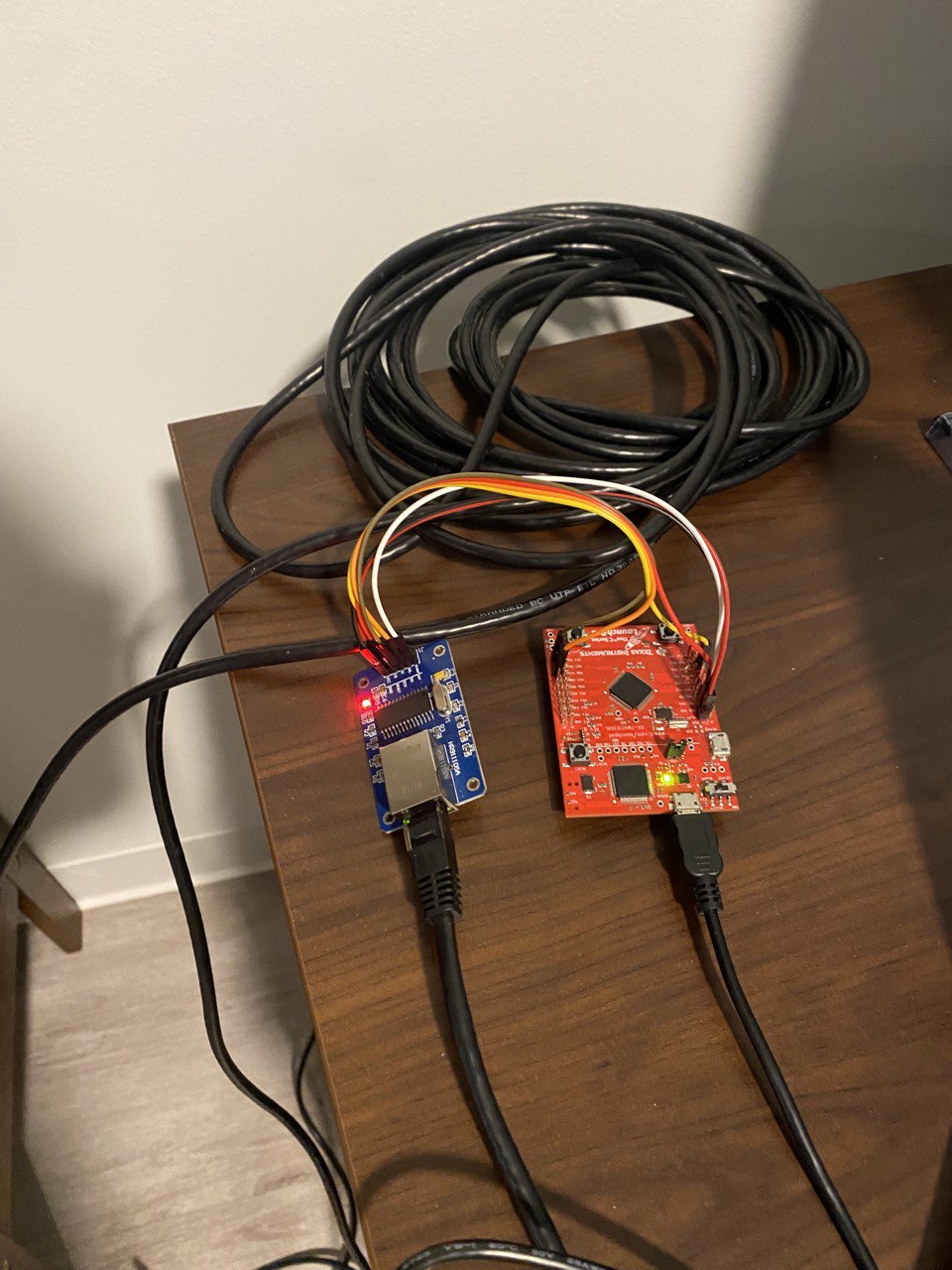
<p>Now for the moment of truth. I wire up the TM4C to the ENC28J60 which then connects to the 50 ft. spare CAT6 cable lying in my room. 
I connect the other end of the cable to a port in the wall, flash the MCU, and test it out.</p>

<div class="language-plaintext highlighter-rouge"><div class="highlight"><pre class="highlight"><code>$ python client.py                      
Received b'Hello. What is your name?\n'
</code></pre></div></div>

<div class="language-plaintext highlighter-rouge"><div class="highlight"><pre class="highlight"><code>$ ping 192.168.1.150
PING 192.168.1.150 (192.168.1.150) 56(84) bytes of data.
64 bytes from 192.168.1.150: icmp_seq=2 ttl=64 time=4.56 ms
64 bytes from 192.168.1.150: icmp_seq=3 ttl=64 time=4.45 ms
64 bytes from 192.168.1.150: icmp_seq=4 ttl=64 time=3.95 ms
64 bytes from 192.168.1.150: icmp_seq=5 ttl=64 time=3.73 ms
^C
--- 192.168.1.150 ping statistics ---
5 packets transmitted, 4 received, 20% packet loss, time 4012ms
rtt min/avg/max/mdev = 3.734/4.173/4.560/0.341 ms
</code></pre></div></div>

<p>Somewhat to my surprise, it works without any issues!</p>

<p><img src="/assets/img/tm4c_enc28j60.jpeg" alt="Rate my setup" />
<em>“Rate my setup”</em></p>

<p>What’s so cool to me about uIP is its elegant simplicity. It doesn’t take much effort to port the stack to any system. And all that functionality is 
contained in less than 3000 lines of code. This program also didn’t really do anything useful, but the main packet processing loop could be moved into 
its own thread on a multi-threaded system or even replaced altogether by timer and packet-driven interrupts. 
I’m looking forward to trying out a few of the other example projects and adding the stack to some other projects in the future.</p>

<hr />
<p><strong>Further Reading</strong>:</p>

<p><a href="https://en.wikipedia.org/wiki/UIP_(micro_IP)">uip (micro IP)</a></p>

<p><a href="https://en.wikipedia.org/wiki/Contiki">Contiki</a></p>]]></content><author><name></name></author><summary type="html"><![CDATA[The repo for this project is located here.]]></summary></entry></feed>